Building a Better Lighting Control App with AI
Articles | Apr 14 2026 | Tom Von Lahndorff
Building a Better Lighting Control App with AI
I have an outdoor lighting system at my house — the kind with a gateway, relay controllers, and scheduling based on sunset and sunrise times. The hardware itself is solid. The manufacturer's app? Not so much.
It was slow, buggy, and clearly designed as an afterthought. Simple things like checking if the lights were on or adjusting the schedule felt like a chore. The UI was cluttered with features I didn't need, and the things I did need were buried three screens deep. It would lose connection, fail silently, and generally make me not want to open it.
So I decided to build my own.
The Approach: AI-Assisted Development
I built the entire app working with Claude. Not as a code generator where I'd copy-paste snippets — as a real collaborator. I'd describe what I wanted, we'd talk through the approach, and Claude would write the code while I focused on how it should feel to use.
The entire app is roughly 1,100 lines of code. No frameworks, no npm dependencies, no build step. Just vanilla HTML, CSS, and JavaScript talking to a Node.js proxy server. I kept pushing to keep it dead simple — every time Claude was tempted to add complexity, I'd step back and ask if there was a simpler way.
The proxy server is about 125 lines. It forwards my requests to the manufacturer's API while handling authentication and CORS. That's the entire backend.
Mobile-First, Because That's How I Use It
The whole point was to control my lights from my phone. So every design decision started with "how does this feel on an iPhone?"
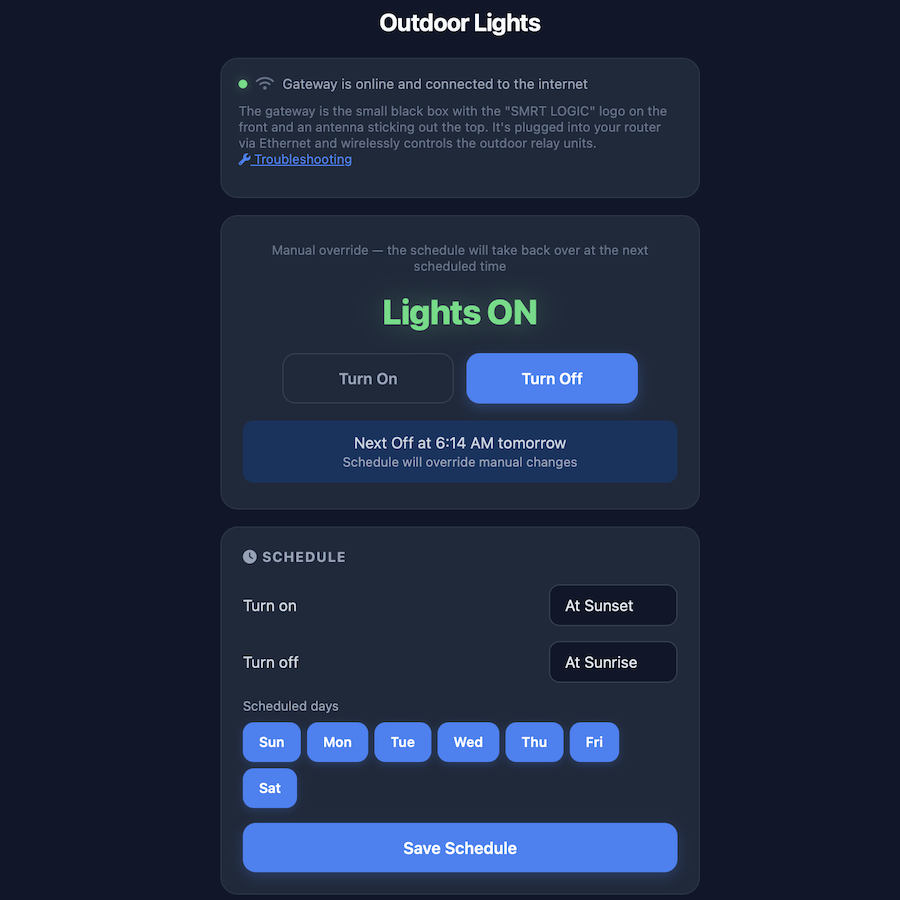
Big, obvious controls. Two buttons: Turn On and Turn Off. The current state is displayed in large text with color coding — green for on, red for off. No ambiguity.
Touch-optimized everything. Buttons have active states that scale down slightly when pressed, giving that satisfying tactile feedback. Touch targets are generously sized. No tiny links or cramped layouts.
PWA installation. The app installs to my home screen like a native app. It launches full-screen with a dark status bar that blends seamlessly into the dark UI. The custom lightbulb icon sits right next to my other apps.
Dark theme by default. I'm usually checking the lights at night. A dark interface with high-contrast text and subtle glow effects on status indicators means I'm not blinding myself.
Smart state management. When I tap "Turn On," the app doesn't just fire the command and hope for the best. It polls the actual hardware to confirm the lights changed state, showing a pulsing animation while it waits. If something goes wrong, I know immediately.
The Schedule System
The original app's scheduling was its worst feature — a confusing maze of options that somehow made "turn lights on at sunset" feel complicated.
My version keeps it straightforward. You pick "On at Sunset" or set a specific time for on and off. You can enable or disable specific days of the week. The current sunset and sunrise times for my location are displayed right on the screen, updated daily. Save, and it pushes the schedule to the gateway.
What I Learned
Building this reinforced something I already believed: the best software is the software you actually want to use. The manufacturer almost certainly outsourced their software development on the cheap and got exactly what they paid for — a shitty product. Customers buy into the system through a local installer, picking out lights and hardware without ever seeing the app. By the time the lights are installed and you realize how bad the software is, you're locked in. Most people just accept it.
I don't. Shame on any company that short-changes customers to pad profits. I have the hardware now and I'll maintain it as long as I can on my own terms. Down the road, the whole system will probably get replaced — possibly by a far cheaper and better homegrown solution.
But here's the real takeaway: I built something 10x better myself. And with AI tools like Claude, most people can too. You don't need a dev team. You don't need a computer science degree. You need a clear idea of what you want and the willingness to keep refining it until it's right. Working with Claude is like having a collaborator who never gets tired and has infinite patience for "actually, can we try it this other way?" Describe what you want, build it, try it, tweak it. That's it. That's the whole process.
The Stack
For anyone curious about the technical details:
- Frontend: Vanilla HTML/CSS/JS, zero dependencies
- Backend: Node.js proxy server (~125 lines), zero npm packages
- Deployment: Opalstack VPS, deployed via rsync
- PWA: Web App Manifest, custom SVG icon, home screen installable
- Design: System fonts, CSS animations, dark theme, safe-area insets for modern phones
The entire codebase fits in four files. It loads instantly, works reliably, and does exactly what I need — nothing more.


Find the Unicorns
Articles | May 9 2026 | Tom Von Lahndorff
I've been called a unicorn a few times in my career. Usually it's because I cross between design and development — I can build the thing and make it look right. In tech, this combination is rare enough that people pull out the word and use it like a compliment, but also like they're describing a
Building a Better Lighting Control App with AI
Articles | Apr 14 2026 | Tom Von Lahndorff
I have an outdoor lighting system at my house — the kind with a gateway, relay controllers, and scheduling based on sunset and sunrise times. The hardware itself is solid. The manufacturer's app? Not so much. It was slow, buggy, and clearly designed as an afterthought. Simple things like
10 CSS Features That Actually Work Everywhere Now (2025)
Articles | Nov 20 2025 | Tom Von Lahndorff
CSS has changed a lot in the past few years. Features that used to require JavaScript or preprocessors are now native. Things that seemed impossible are now standard. The performance impact is huge. Native CSS runs faster than JavaScript, doesn't block the main thread, and gets optimized by the

Top 10 Tips for Working with Claude Code
Articles | Nov 15 2025 | Tom Von Lahndorff
Working with Claude Code (Anthropic's official CLI for AI-assisted development) has been a game-changer for my development workflow. Over the past few months, I've used it across several projects - refactoring legacy code, building new features, and optimizing performance. Through trial and error,